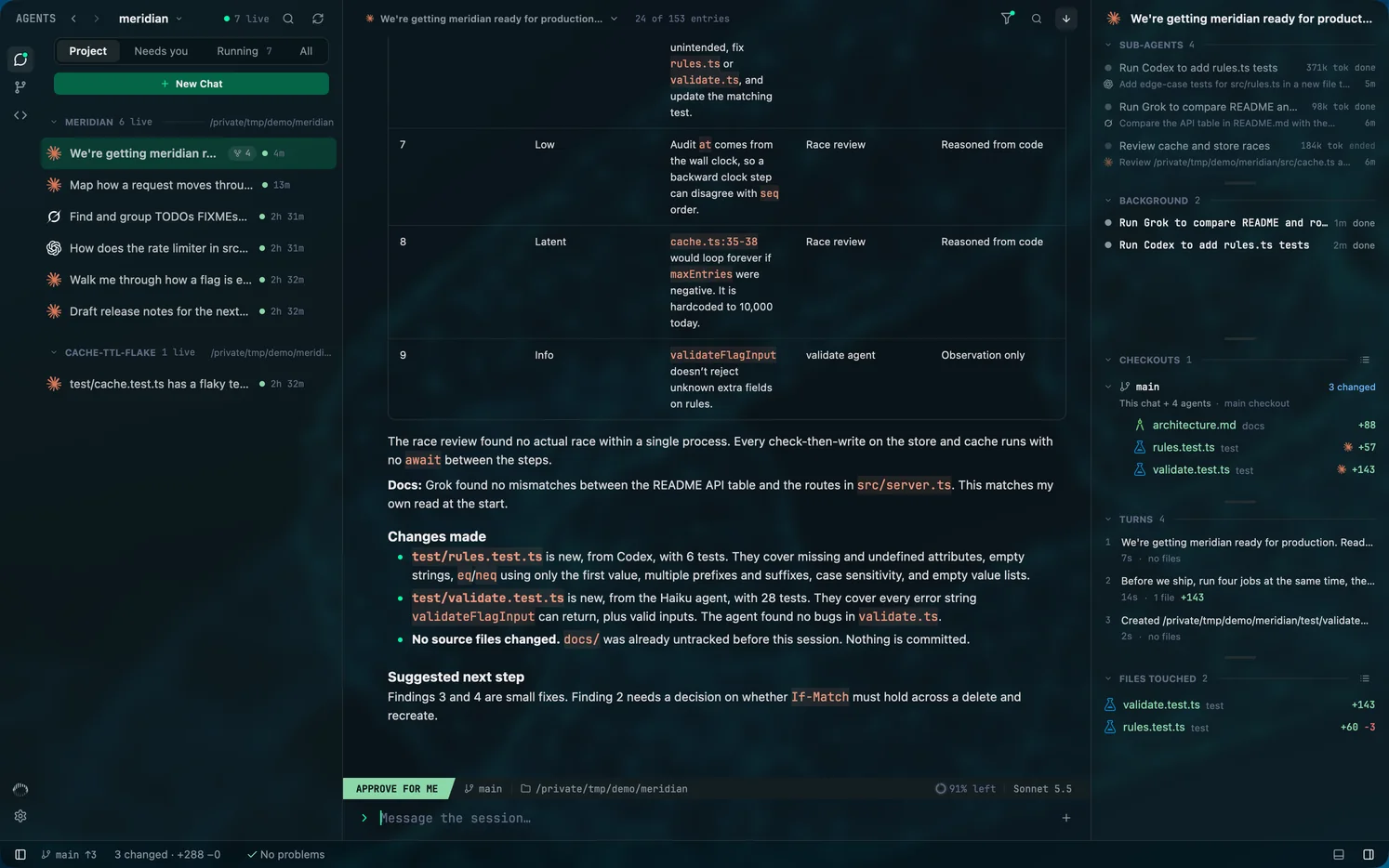
Agent trees: when one agent starts another
Mentat nests every agent under the session that started it. That covers a tool's own sub-agents and also a run one agent starts from its shell, even when the run belongs to a different vendor: a Claude Code chat that runs codex exec shows that Codex run in its tree.
Checked against Mentat's code on .
Sub-agents
Each tool records its own sub-agents: Claude Code's sub-agents, the child threads Codex spawns, and Grok Build's. Mentat reads those records and nests each sub-agent under its parent, with its task and whether it is working, done, failed or stopped.
Runs started from an agent's shell
When an agent runs claude -p, codex exec or grok -p as a shell command, the new run nests under the session that ran the command. While the run's process is alive, Mentat uses the session id the starting tool passes down to it.
Otherwise it matches the two: the run must begin within 60 seconds of the command. A command that carries the run's opening prompt wins. Without one, the run is attached only when a single session was working in that folder. If two sessions fit equally well, the run is left on its own rather than guessed at.
- A claude -p started from Claude's desktop app or from VS Code's chat is not matched.
Names and mentions
A sub-agent that its tool labels only by its task gets a short name from Mentat, so you can refer to it; the task stays on the row's second line. Names are given once, in the order a chat's agents were made, and do not change. Chats, Codex's own agent nicknames and runs started from an agent's shell keep the names they have. Settings, Agents, Name sub-agents turns the names off.
Type @ where a word starts in the composer to mention one of the chat's agents, another chat, or a file in the chat's checkout. The agent you are writing to gets your words and a short note naming each mentioned item: an agent's name and id, a chat's title, folder and history file, a file's path.
- A file mention can name lines: @cache.ts:42 or @cache.ts:42-80.
- A chat mention points at that chat. It does not send the chat a message.
- A mention whose agent, chat or file is gone is shown struck through and sent as plain words.
- In a sent message, pointing at a mention shows its card, and clicking it opens the agent, chat or file.
The details rail
| Section | What it lists |
|---|---|
| Sub-agents | The tree of agents the chat started, each with its tool's mark and state. |
| Tasks | The agent's checklist. |
| Background | Background commands: running, done, failed or stopped. |
| Checkouts | The working-tree changes in each checkout the chat and its agents used. |
| Turns | Each turn, and what changed in it. |
| Files touched | Every file the chat and its agents changed. A running Codex turn's files are under This turn. |
Cmd + Shift + B shows and hides the rail.
How each agent's diff is built
A diff is rebuilt from the agent's own record of its edits, not from git diff, which is why two agents working in one checkout stay apart. Claude Code records the text before and after an edit; Codex and Grok Build record patches.
- A file shows no diff when the tool's log names it without recording the change. A Claude Code sub-agent's log records the file it created, but not its later edits.
- Edits Claude Code made through shell commands are marked via shell, with diffs for up to five files.
- A file over 1 MiB is counted but its text is not kept.
- When the log holds no change for a file, opening it falls back to the working-tree diff.
Stopping one agent, and backgrounding
Stop agent and Stop task, in a row's menu, stop one piece of work while the rest carries on. Stopping a single task, and moving a running command to the background with Ctrl + B, are Claude Code features; Codex and Grok Build stop the whole turn.
Reading agents side by side
Click a sub-agent and its chat opens as a tab beside the chat that started it. A tab's menu offers Split right, Split left, Split up and Split down, which move the tab into a pane of its own, and each pane has a Maximize button. Columns are drawn only while each has at least 480 points of width; in a narrower window the agents stay as tabs of one pane.